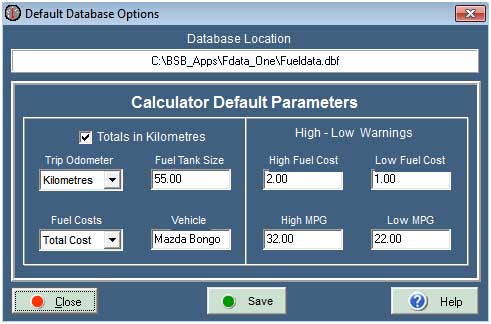
Setup Options.
You can change the default selection for the Drop.Down Boxes when entering data, such as the Odometer and fuel costs. You can also change the fuel tank capacity and the vehicle Identity.
Totals In Kilometres
When averaging Trip.Records, The default Total.Distance is shown as Miles. If you tick this check box - as shown above - then the Total.Distance is displayed as Kilometres. This is a dynamic function and only affects the output when Averaging.
Trip Odometer
The default is Miles, but if you always enter Kilometres for this value then click the appropriate Drop.Down box to change the default.
Fuel Costs
The default is Total Cost, but if you always enter Cost.per.Litre for this value then click the appropriate Drop.Down box to change the default.
High / Low - Fuel Cost
These two settings only affect the results of a calculation on the Calculation page. You will get a Nag.Message if the results of your calculation are beyond your expectation for the Fuel Costs. You can set the values as tight or loose as you want, which can avoid posting out of range results. The default values are 2.00 and 1.00 Pounds but you can change these to suit your own preferences as shown above.
High / Low - MPG
You will get a Nag.Message if the results of your calculation are beyond your expectation for the Miles.per.Gallon. If you set the Minimum to 0.00 and the Maximum to at least 100.00 you will probably not get a Nag.Message. You can set the values as tight or loose as you want, which can avoid posting out of range results. The default values are 40.00 and 20.00 but you can change these to suit your own preferences as shown above.
Tank Capacity
The default fuel tank capacity is 55 Litres. If you have an LPG gas conversion you may want to change this value if the LPG tank is larger or smaller. The tank capacity values will only affect the calculations for predicted Maximum miles or Kilometres per tank. This is a dynamic property and changing this will change the calculation results as well as all averaging calculations, regardless of the age of the records.
Vehicle Identity
I you are using 2 or 3 databases for different vehicles, you may want to change the Default name. This can be anything you want up to a maximum of 12 characters. It is usual to choose the vehicle name or registration number. This is a dynamic property which can be changed at any time. The Vehicle.Identity is used when data is copied to the clipboard and shown in other places for Identification purposes only.
Save Button
You can Save any amended details without closing the Setup page.
Close Button
If you close the Setup Page and you have amended any information without saving it, a Save.Confirmation message will be displayed.

Copyright © Ben Bruce - BSB Applications - Freeware.