Averages
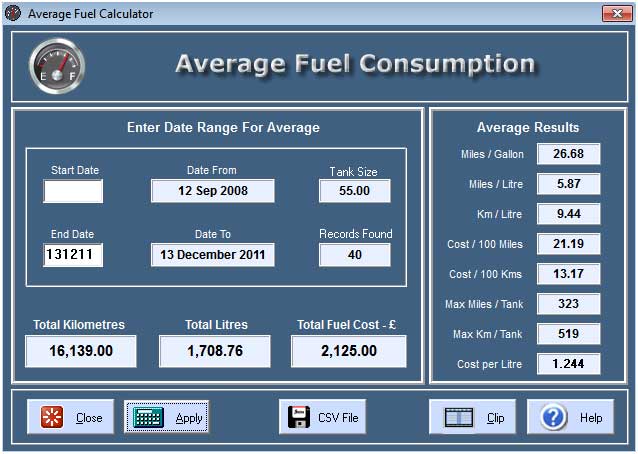
You can calculate your average fuel consumption and costs over any selectable period. Simply click the Apply button to calculate the average for all available records in the database.
Total Distance
The default Total.Distance is shown as Miles. All Kilometre distances recorded are converted to Miles. You can change this default value to show Kilometres on the Setup page and Total.Distance will then be shown as Kilometres.
Date Entry
Dates are enered in a 6 figure format DDMMYY you must enter all 6 numerals. If you enter an Invalid date, then an error message will be displayed when you click the Apply button. If you leave the date fields blank or enter a Start or End date, then the dates are converted and displayed in the appropriate boxes. If you enter 131210 in a date box it will be displayed as 13 December 2010. Enter single numeric parameters as 01 02 03 (1st February 2003).
Start Date
If you leave this box completely blank, the Average will start from the earliest date in the record database. If you enter a date in this box then the Average will start from the Entered date.
End Date
If you leave this box completely blank, the Average will end at the latest date in the record database. If you enter a date in this box then the Average will end at the Entered date.
All Dates
If you leave both the date entry boxes completely blank, then all appropriate record dates in the database will be included in the Average.
Invalid or Garbage Records
You may have marked some records as Invalid or Garbage. These records are never included when using the Average function. If you ADD a Record which has a Zero Dustance or a Zero Fuel Used then these are automatically Marked as Invalid. If you choose to Un-Mark this type of record, they will still NOT be included in the Average results, It would cause the Average values to be unreliable.
Record Indicator
The right small box in the centre of the lower panel indicates the number of records found and included in the Average. If no records are found for your particular selection then a message is displayed to notify you.
Apply Button
Select the required Date range and then click the Apply button.
CSV File Button
If you want to use the available data for your own analysis purposes, for example in MS.Excel, you can create a Comma Seperated Variable (CSV) file. You must display an average for a certain period Before using this facility to determine the number of records available. Below is an example of the CSV output. The Header is optional and can be discarded if required.
Date, Miles, Litres, Fcost, MPG
23-Mar-11,248.55,47.89,67.00,23.59
05-Apr-11,285.83,48.00,67.31,27.07
31-May-11,254.14,45.00,62.50,25.67
03-Jul-11,154.10,29.79,40.48,23.52
08-Sep-11,267.19,46.00,64.81,26.41
27-Sep-11,247.93,42.02,59.20,26.82
07-Nov-11,249.17,40.00,52.69,28.32
Close Button
The close button returns you to the Calculator Main Page.
Help Button
This Windows Help File is available on all calculator pages.
Clip Button
When the average calculation has completed you can copy the results to the Windows.Clipboard in a set format which can be Pasted into any text editor.
Text is copied as Plain Text. The columns will NOT line up if your Editor is set to use a Proportional.Font. The Font used here is Courier.New wh-ich is a Mono.Spaced Font.
Mercedes Car 1 Jan 2011
------ Period Averages -----
Records Found: 31
Records From: 20 Oct 2008
Records To: 23 Mar 2011
Tank Size Litres: 55.00
---------- Totals ----------
Total Kilometres: 13128.61
Total Fuel Litres: 1386.71
Total Cost Pounds: 1706.86
------ Average Results -----
Miles per Gallon: 26.74
Miles per Litre: 5.88
Kilometres per Ltr: 9.47
Cost per 100 Miles: 20.92
Cost per 100 Kmtrs: 13.00
Max Miles per Tank: 324
Max Kmtrs per Tank: 521
Fuel Cost per Litre: 1.231
----------------------------

Copyright © Ben Bruce - BSB Applications - Freeware.