Fuel Consumption Calculator
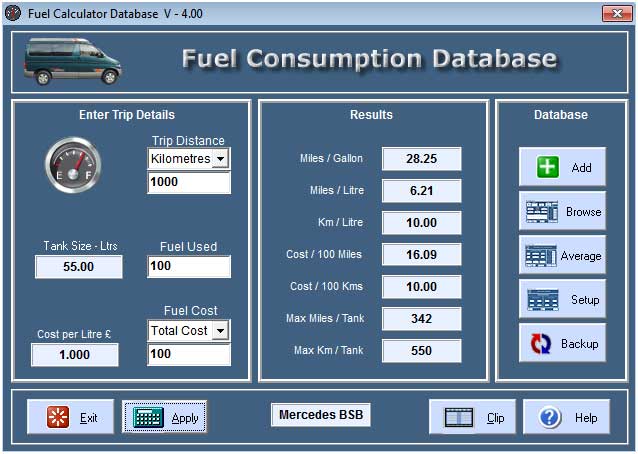
You use the consumption calculator to simply calculate the fuel consumption and fuel cost for any Trip Distance. A Trip is the number of Miles or Kilometres you have travelled starting with a FULL tank and ending when you next fill up and record the Trip.Distance, the Fuel.Used in Litres, and the Total Fuel.Cost from the fuel station till receipts.
A Trip.Distance or journey can be any length providing you keep the fuel station till receipts every time you add fuel to the tank in any quantity. What is important is to finalise the journey by filling the tank to the Brim and recording the Distance from the Trip odometer. If you intend to continue monitoring the Fuel.Consumption, you should reset the Trip odometer at this point before starting a new trip.
You can't rely on the accuracy of older fuel gauges, for accurate results you must start a Trip with a FULL tank, and end the Trip with a FULL tank of fuel.
Trip Distance
The default Trip Distance selector is set to record Miles. If your Trip.Odometer normally records Kilometres, then this default setting can be changed on the Setup page. You can change this selection temporarily while entering the current record.
Fuel Used
Enter the total fuel used on the Trip in Litres.
Fuel Cost
Enter the Total fuel cost or Price.per.Litre for the Trip in GB Pounds. The default setting can be changed on the Setup page. The cost per litre of fuel is calculated from the Fuel.Used and Total.Cost.
Apply Button
Before you press the Apply button, make sure all the parameters are entered correctly. The program will try to detect any errors and notify you of apparent "Out Of Range" errors, but only you can ensure that the calculated values are within the range you expected. It may be the case that Zero fuel cost was applicable, for example if you had run your vehicle on 100% FREE waste vegetable oil, if this is the case then you will be asked to confirm the entry.
Stop Button
The Stop button terminates the program.
Help Button
This Windows Help File is available on all calculator pages.
Database Buttons
The database buttons are used to access the functions described below. You can use the database to record all TOTAL fuel used and TOTAL Mileage. If you forget to Add calculated records to the database then TOTAL values will only apply to those records which were saved. If you are only interested in recording long Trips, you can enter only the Trips which you are interested in for the purposes of calculating Average results.
Add Button
If you are happy with your Results after clicking the Apply button, you can Add the current results to the database. If you want to add Trip.Notes to the record then you should click the Browse button Immediately after Adding, and the last record Added to the database will be displayed where you can enter the appropriate Trip.Notes. If you try and Add a Zero record to the database you will be asked to Confirm your choice, you can Add Zero records to the database simply to create extra Trip.Notes or Service Records and the record will be marked as Invalid.
Browse Button
Clicking the Browse button displays the Browsing page where you can Navigate through all available records adding Trip.Notes or marking the record as Invalid. Read the Browsing page Help for information on how to use the page.
Average Button records
Click the Average button to access the Average page. Read the Average page Help for information on how to use the page.
Setup Button
Click the Setup button to access the Setup page. Read the Setup page Help for information on how to use the page.
Backup Button
Click the Backup button to access the Backup page. Read the Backup page Help for information on how to use the page.
Clip Button
When the fuel consumption calculation has completed you can copy the Results to the Windows.Clipboard in a set format which can be copied into any text editor.
Text is copied as Plain Text. The columns will NOT line up if your Editor is set to use a Proportional.Font. The Font used here is Courier.New which is a Mono.Spaced Font.
Mercedes Car 1 Jan 2011
---------- Totals ----------
Trip Miles: 600.00
Fuel Used Litres: 100.00
Fuel Cost Pounds: 135.00
Tank Size Litres: 55.00
--------- Results ----------
Miles Per Gallon: 27.28
Miles Per Litre: 6.00
Kilometres Per Ltr: 9.66
Cost Per 100 Miles: 22.50
Cost Per 100 Kmtrs: 13.98
Max Miles Per Tank: 330
Max Kmtrs Per Tank: 531
----------------------------

Copyright © Ben Bruce - BSB Applications - Freeware.